
Referral code · Sign-up · Adding it later
OKX referral code nexu888: 20% fee discount (checked Nov 2026)
Enter nexu888 when you register and your trading fees are cut by 20%. OKX's referral FAQ says the code must be added before the account is created; after registration the referral relationship usually can't be added or changed. You get one chance.
Can you add an OKX referral code after sign-up? Usually not: it goes in before the account is created
“Referral codes must be added before invitees create their accounts.”
“After account registration is complete, the Referral relationship usually can't be added or changed.”
Quoted from each exchange's help centre, checked 2026-11-11.
- Can I add it after sign-up?
- No. OKX requires the code before registration is complete; it cannot be added or swapped afterwards.
- What do I get?
- This code gives you a 20% trading-fee discount, settled automatically by OKX, and enrols you in OKX's new-user rewards.
- Where do I enter it?
- On the email step of sign-up, expand "Referral code (optional)". If you opened an invite link in the last 30 days it is pre-filled.
- Where do I check it?
- App: Menu → Account settings → Profile → Referral rewards. If that entry is there, the account has a referral.
Forgot to enter the code?
Both of OKX's official FAQs agree: the code must be used before registration is complete. It cannot be added afterwards, and an existing referral cannot be swapped for someone else's. Unlike Binance and Bybit, OKX has no late-binding window.
The only cushion is the invite link: if you opened someone's invite link in the last 30 days, the sign-up page pre-fills that code. Check whose code is pre-filled before you submit, and change it then if it is not the one you want.
To check whether you have a referral, open Menu → Account settings → Profile in the app and look for Referral rewards. If it is there, you are linked. The page does not name the inviter; OKX suggests recalling the code you used or asking the person who invited you.
OKX sign-up steps
| Step | What to do | Notes |
|---|---|---|
| 1 | Choose your country or region of residence | It must match the ID you will verify with. |
| 2 | Enter your email and the referral code | Expand "Referral code (optional)" and make sure it reads nexu888. This is the only place a code can go. |
| 3 | Enter the email code | 6 digits, valid for 10 minutes. |
| 4 | Link a phone number | Enter the number, tap Verify now and type the 6-digit SMS code. |
| 5 | Set a password | Registration is complete; identity verification comes next. |
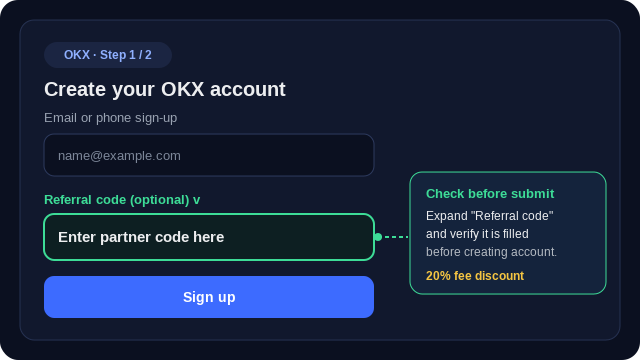
nexu888 is entered before submitting.Identity verification (KYC)
- Web: on the verification page choose Individual account → Continue. App: Menu → Account settings → Verification.
- Fill in country, nationality, name, date of birth, ID number and address. You must be 18 or older.
- Upload a government-issued ID such as a passport, national ID, driving licence or residence permit; screenshots are not accepted. Then take a selfie for the face check.
- Proof of address only when asked (issued within 6 months in the EEA, 3 months elsewhere). OKX says reviews usually take up to 24 hours.
Where it is not available
OKX's global Risk & Compliance Disclosure (updated 2026-07-08) lists where the service is not offered, including Afghanistan, Canada, Cuba, Hong Kong, Iran, India, Japan, Malaysia, Nepal, North Korea, Syria, parts of the United States and all US territories, and Uzbekistan.
OKX runs separate entities in the US, the EEA and the Middle East, each with its own region list. Check that your local law allows you to use an offshore exchange before you register.
Fees and how much comes back
Base fees for a regular (VIP 0) account from our fee database. The amount back uses this code's rebate share and excludes token discounts and promotions.
| Market | Maker / taker | Taker fee on 10,000 USDT | 20% off |
|---|---|---|---|
| Spot | 0.080% / 0.100% | 10 USDT | 2 USDT |
| USDT-margined futures | 0.020% / 0.050% | 5 USDT | 1 USDT |
Fees checked: 2026-11-07 · OKX fees and exchange review · Compare fees across exchanges · OKX fees in detail · OKX VIP 1–9 trading & withdrawal fees
Official sources
Every rule here comes from the exchange's help centre, checked page by page on 2026-11-11; the date in brackets is the page's own update date. The exchange's current page always wins.
- OKX Referral Program FAQ ↗ (updated 2026-09-17)
- What is the OKX Referral Program? ↗ (updated 2026-10-05)
- How do I register an account on OKX? ↗ (updated 2026-10-12)
- How do I verify an individual account? ↗ (updated 2026-08-25)
- OKX Risk & Compliance Disclosure ↗ (updated 2026-07-08)
FAQ
What is the OKX referral code?
The code on this page is nexu888. Enter it on the email step of sign-up under "Referral code (optional)".
Can I add an OKX referral code after registration?
No. OKX says the code must be added before the account is created; after registration the referral relationship usually can't be added or changed.
How do I know my referral code was applied?
In the app open Menu → Account settings → Profile. If you see Referral rewards, the account has a referral.
What is the OKX referral bonus with this code?
A 20% trading-fee discount. On a 10,000 USDT futures taker order the fee is 5 USDT and 1 USDT is taken off. You are also enrolled in OKX's new-user rewards; the tasks shown in the Rewards Center apply.
How do OKX new-user rewards work?
OKX says you need Advanced verification and must finish the deposit, trading or volume tasks listed within 14 days of sign-up. Rewards appear under Rewards Center → New user rewards and vary by region and campaign.
Not on OKX yet?
The code can only be entered at sign-up. Put in nexu888 before you submit.